Categories:
Author:
Current version:
0.1.1
About It:
Get it:
Rate it:
Flag it:
If you'd like to provide updated information and do not have access to directly edit, please contact the site admin; thanks!
jea_latex_txp
- include math formulae and other Latex code in articles
- good rendering quality
- caching
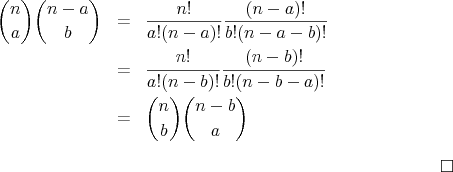
This is how rendered formulae will look like:
Usage
Use the <txp:jea_latex> tag to display Latex-rendered formulae in your
textpattern article. It’s highly recommended to wrap your formulae with the
<notextile> tag as otherwise unwanted characters might slip into the rendered
formulae. Example:
<txp:jea_latex>
   <notextile>
     \begin{eqnarray*}
         {n \choose a} {n-a \choose b}
         &=& \frac{n!}{a!(n-a)!}\frac{(n-a)!}{b!(n-a-b)!} \\
         &=& \frac{n!}{a!(n-b)!}\frac{(n-b)!}{b!(n-b-a)!} \\
         &=& {n \choose b} {n-b \choose a}
     \end{eqnarray*} $\hfill \square$
  </notextile>
</txp:jea_latex>
Installation
Install latex2image on your web server
latex-txp depends on the latex2image web service which will render the latex formulae. This plugin expects the latex2image script to be located directly below your webroot where textpattern is located. Example:http://www.example.com/latex2image.phpGet latex2image from https://github.com/jeadorf/latex2image. Carefully follow the installation instructions provided by latex2image. You can check whether your latex2image installation works by performing a request like this:http://www.example.com/latex2image.php?latex=$$\square$$It should prove operational by showing a small square.Install latex-txp as a textpattern plugin
Copy, paste and install the latex-txp plugin just like any other textpattern plugin in the backend plugin installation tab. You should now be set.
Keywords/tags:
Initially released:
2010-05-22
Posted here:
22 May 2010